

A/B test a form
An A/B test shows half of your visitors one version of a form and half another, then tells you which one more people finish. In ClarNow the second version, variant B, lives inside the same form: one link, one embed code, one table of responses. You change B in the usual builder and decide when to stop.
A/B testing is on the Pro and Business plans. For an overview, see A/B testing.
What B shares with A
Section titled “What B shares with A”| A and B share | B has its own | |
|---|---|---|
| Address | Link and embed code | — |
| Content | Form type | Questions, choices, pages, logic, welcome screen, endings, variables |
| Look | — | Theme |
| Settings | Access, notifications, integrations, tracking, contacts | Settings saved with each publish |
| Responses | One table, one export, the same webhooks and integrations | A Variant mark on each response |
So you can test a short form against a long one, different wording, a different first question, another ending or a new theme, and your integrations keep working for both.
Create variant B
Section titled “Create variant B”-
Open the form in the builder.
-
Above the list of questions, click Create variant B. B starts as a copy of the form.
-
The A | B switch above the questions now shows which version you are editing. With B selected, every change goes to B; A stays as it is.
-
Make your changes to B, then click Publish. With B selected, Publish publishes B only.
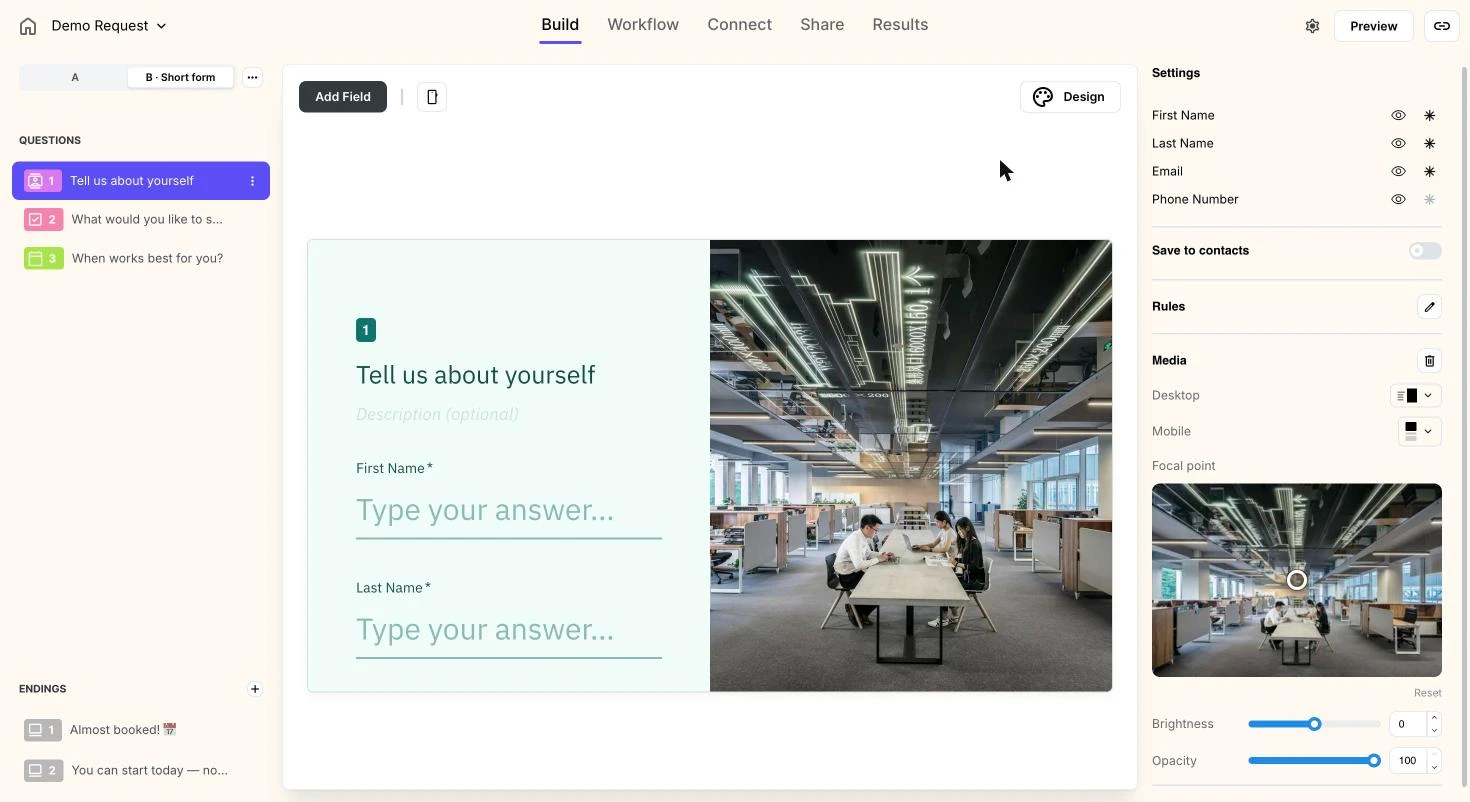
The menu next to the switch renames B — a label like Short form helps you remember what you are testing — or deletes it. Deleting B removes its draft; its published versions and the responses it collected stay.
Start the test
Section titled “Start the test”-
Go to Share → A/B Test.
-
Check that B shows Published. If it says Not published, click Edit B and publish it first.
-
Click Start test. From now on half of the new visitors see B.
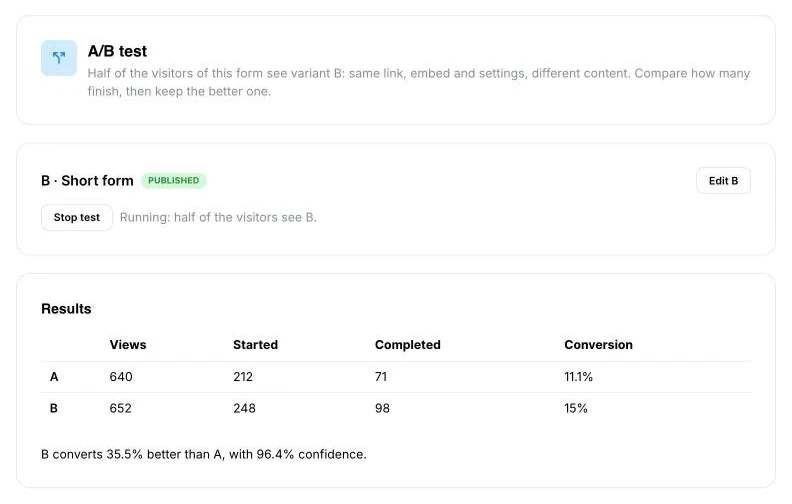
Each new visitor gets A or B at random, 50/50. Someone who leaves halfway and comes back to finish sees the same version again. After they submit, their next visit is a fresh draw.
Read the results
Section titled “Read the results”The results table on the A/B Test tab counts, for each version:
- Views — how many times the form was shown.
- Started — responses begun.
- Completed — responses submitted.
- Conversion — completed responses per view.
Below the table, one line tells you what the numbers mean:
- Not enough data yet — either version has fewer than 100 views or fewer than 10 completed responses. The line says roughly how many more views it needs.
- No clear difference yet — the gap between A and B could still be chance; the line shows the confidence so far.
- B converts 35.5% better than A, with 96.4% confidence (or the other way round) — the difference is unlikely to be chance: confidence is 95% or more.
Confidence comes from a standard two-proportion test on completions per view. ClarNow never stops a test or picks a winner on its own: a test that runs too short often names a leader that wouldn’t hold up.
How many views your test needs before you decide, and why checking every day and stopping at the first 95% misleads: see How to A/B test a lead form on the blog.
Choose a winner
Section titled “Choose a winner”-
Click Stop test. The results freeze at that moment, and Start a new run appears in case you want to keep testing.
-
Choose:
- Use B — B’s published content becomes the form and is published under the same link. B is deleted.
- Keep A — the form stays as it is. B is deleted.
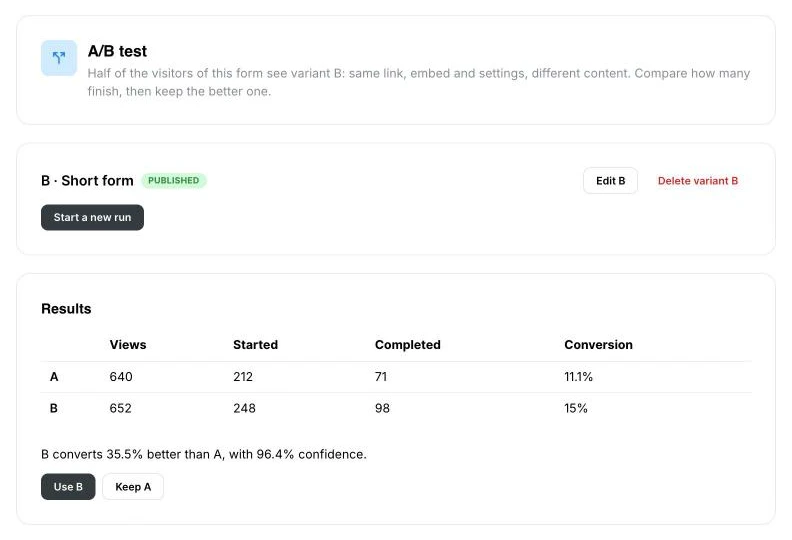
Either way, every response stays in the form, each with the version it was given on. To test again, create a new B, publish it and start a new test.
A and B in your responses
Section titled “A and B in your responses”- Results has a Variant column and a filter for it. A question only B asks gets its own column; questions both versions share stay in one column.
- CSV export includes the Variant column and follows the filter.
- Webhooks and the API send
variant,aorb, on responses collected during a test. - Embed events carry
abVariant: 'a' | 'b'while a test runs, and Google Analytics 4 gets anab_variantparameter on form starts and leads, so you can compare the versions in your own analytics too. See Google Analytics 4 and Google Tag Manager.
Creating B and starting a test need the Pro or Business plan. If your plan drops below Pro during a test, the test pauses: everyone sees A until you upgrade. A paused test can still be stopped, its results read and a winner chosen.
Which plan do I need for A/B testing?
Pro or Business. On a lower plan you can't create variant B or start a test. If you downgrade while a test runs, it pauses — everyone sees A — and you can still stop it and pick a winner.
Do I need a second link or a second embed code?
No. B lives inside the same form, so the link and the embed code stay the same. ClarNow decides which version each visitor sees.
How are visitors split?
Half and half, at random, for each new visitor. Someone who leaves halfway and comes back to finish sees the same version they started; after they submit, their next visit is a new coin toss.
What does B share with A?
Everything that isn't content. The link, embed, access settings, notifications, integrations, tracking and contacts are the form's own and apply to both. B has its own questions, choices, pages, logic, welcome screen, endings, variables, theme and versioned settings. The form type is the same for both.
How does ClarNow decide which version wins?
It compares the share of views that end in a submitted response. Until both versions have at least 100 views and 10 completed responses, it says there isn't enough data and how many more views it needs. After that it names a leader only at 95% confidence or more; below that it says there is no clear difference yet. It never picks a winner for you.
Can I test three or more versions?
No, only A against B. Most forms get a few hundred visits a month; split three or four ways, each version gets too few for a clear answer.
Can I edit a form while a test is running?
Yes, but changes you publish during a test mix into its results, because some visitors saw the old version and some the new one. The builder shows a warning while a test runs. For a clean result, stop the test, make your changes and start a new run.
What happens to responses when I choose a winner?
Nothing — every response stays in the form, with the version it was given on. Use B copies B's published content into the form and publishes it under the same link; B is then deleted. Keep A leaves the form as it is and deletes B.
How do I tell A and B responses apart?
Results has a Variant column and a filter for it, and a CSV export keeps both. Webhooks and the API send a variant field, a or b, and embed events carry abVariant while a test runs.
Support
Section titled “Support”Email [email protected] or pick a case on the contact page — no account needed. We reply within two business days, usually within one. See also Support.
Cookie preferences
Required for the site to work — security and your session. No tracking.