

Ask for consent to a privacy notice or terms
A Consent question asks respondents to agree to a document — a privacy notice, terms, a research information sheet — without pasting a wall of text into the form. The document opens in a pop-up, the answer is Accepted or Declined, and each response keeps the exact text that was agreed to, when, and whether it was opened.
Add a Consent question
Section titled “Add a Consent question”-
In the form builder, click Add field and choose Consent.
-
Type the question, for example Do you agree to take part in this study?
-
Under Documents, click Add document and choose:
- Text — write or paste the document. It opens in a pop-up for respondents.
- Link — a page on your website. It opens in a new tab.
-
Give each document a title. Respondents see it as the document’s name.
-
Publish the form.
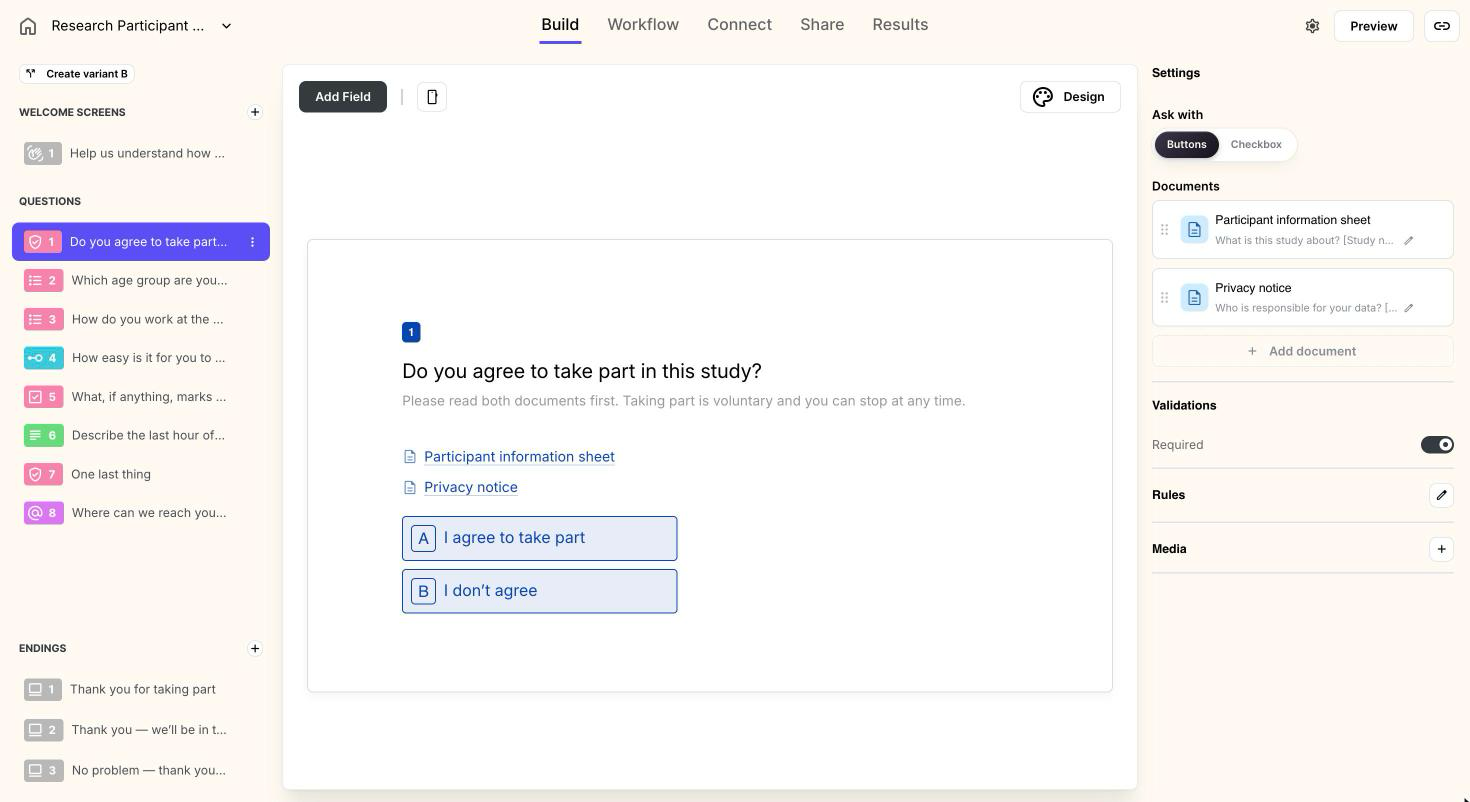
To edit a text document, click Edit text. The editor has headings, bold, italic, lists and links; anything else pasted from Word or Google Docs is dropped, so the pop-up always looks tidy. Drag documents to reorder them.
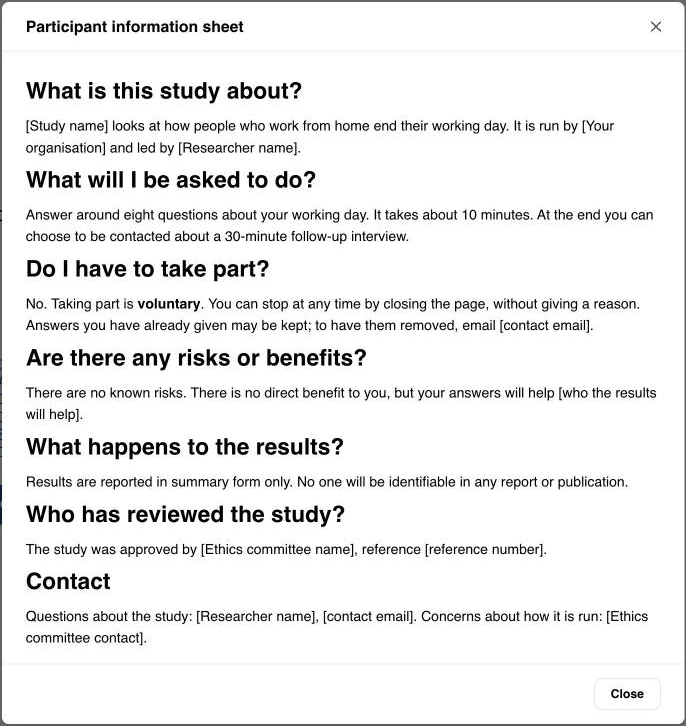
Respondents click a document’s name to read it. A text opens in a pop-up and closes with Close, Esc or a click outside; the keys of the form don’t react while it is open.
Buttons or a checkbox
Section titled “Buttons or a checkbox”Under Ask with, choose how respondents answer.
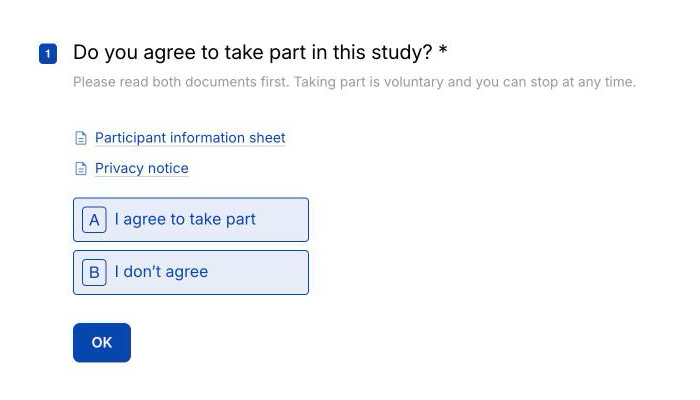
- Buttons — two answers, I accept and I don’t accept (rename them on the canvas). Respondents can also press A or B. Use it when declining is a real answer, as in a research study.
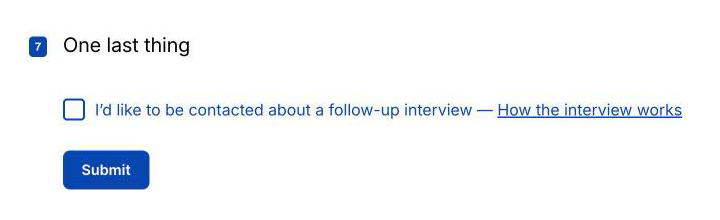
- Checkbox — one box with your own text, such as I agree to the Terms and the Privacy notice. In Checkbox text, put the cursor where a document should be named and use Link to document: respondents see the document’s title there, as a link that opens it. Documents the text doesn’t link to are listed under the box.
With a checkbox, Required means respondents can’t go on without ticking it — they see Please tick the box to continue. If it is not required, leaving it unticked records Declined.
End the form for people who don’t agree
Section titled “End the form for people who don’t agree”Someone who doesn’t accept goes on to the next question unless you say otherwise. While there is no such rule, the right panel shows a hint next to Rules with an Add rule button: it opens the rules with is Declined → ending ready to save. Point it at an ending that thanks them and says nothing more is needed.
You can also build the rule yourself: in the question’s rules, choose the Consent question, is, Declined, and the ending to go to.
See who agreed, to what and when
Section titled “See who agreed, to what and when”In Results, the Consent column shows Accepted or Declined. Filter by it like any other question, and see the split in the summary.
Open a response to see, under the question:
- when it was answered and on which version of the form;
- each document with Opened and the time, or Not opened;
- View text — the documents exactly as they were in that version.
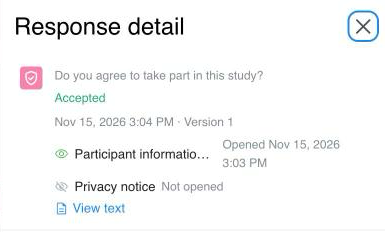
If you change a document and publish again, earlier responses still show the text their respondents saw. That holds for pasted text only: for a Link, ClarNow keeps the address, not what the page said, so keep the page unchanged while you collect answers.
Start from a template
Section titled “Start from a template”The Research Participant Consent template has it all set up: an information sheet and privacy notice to replace with yours, an ending for I don’t agree, and a checkbox at the end for people happy to be interviewed.
Which plan do I need for the Consent question?
Any plan, including Free.
Should I paste the text or add a link?
Paste the text when you need to show exactly what someone agreed to — for an ethics board, a research study or your own records. A pasted text is saved with every response. A link opens your page in a new tab, and ClarNow keeps only its address, not what the page said at the time.
What happens when someone doesn't accept?
By default they go on to the next question, and the response records Declined. To end the form for them, add a rule that sends Declined to an ending — the builder offers one next to the question's Rules.
I changed the text after people answered. Which version did they agree to?
The one that was published when they answered. Every response keeps the form version it was given on, and View text on the response shows that version, not the current one.
How do I know whether someone actually read the document?
ClarNow records when a respondent opens a document, and the response shows Opened with the time, or Not opened. It can't tell how long they read for.
What do webhooks, Google Sheets and Slack get?
The answer as text — accepted or declined in a webhook, Accepted or Declined in Sheets, notifications and exports. The documents themselves are not sent.
Can I import a Typeform legal question?
Yes. A Typeform legal question becomes a Consent question with Buttons. Add the documents after the import — Typeform has none to bring over.
Support
Section titled “Support”Email [email protected] or pick a case on the contact page — no account needed. We reply within two business days, usually within one. See also Support.
Cookie preferences
Required for the site to work — security and your session. No tracking.